Web Development Side Projects
I Built GorGai, a Free App for Learning the Thai Alphabet
GorGai is a free web app I built for learning to read and write the 44 Thai consonants. No account, no paywall, no streak nagging. Here is what it does and why I made it.
I have spent eight years building websites for other people. This one I built for me, and then left it up in case it was useful to anyone else.
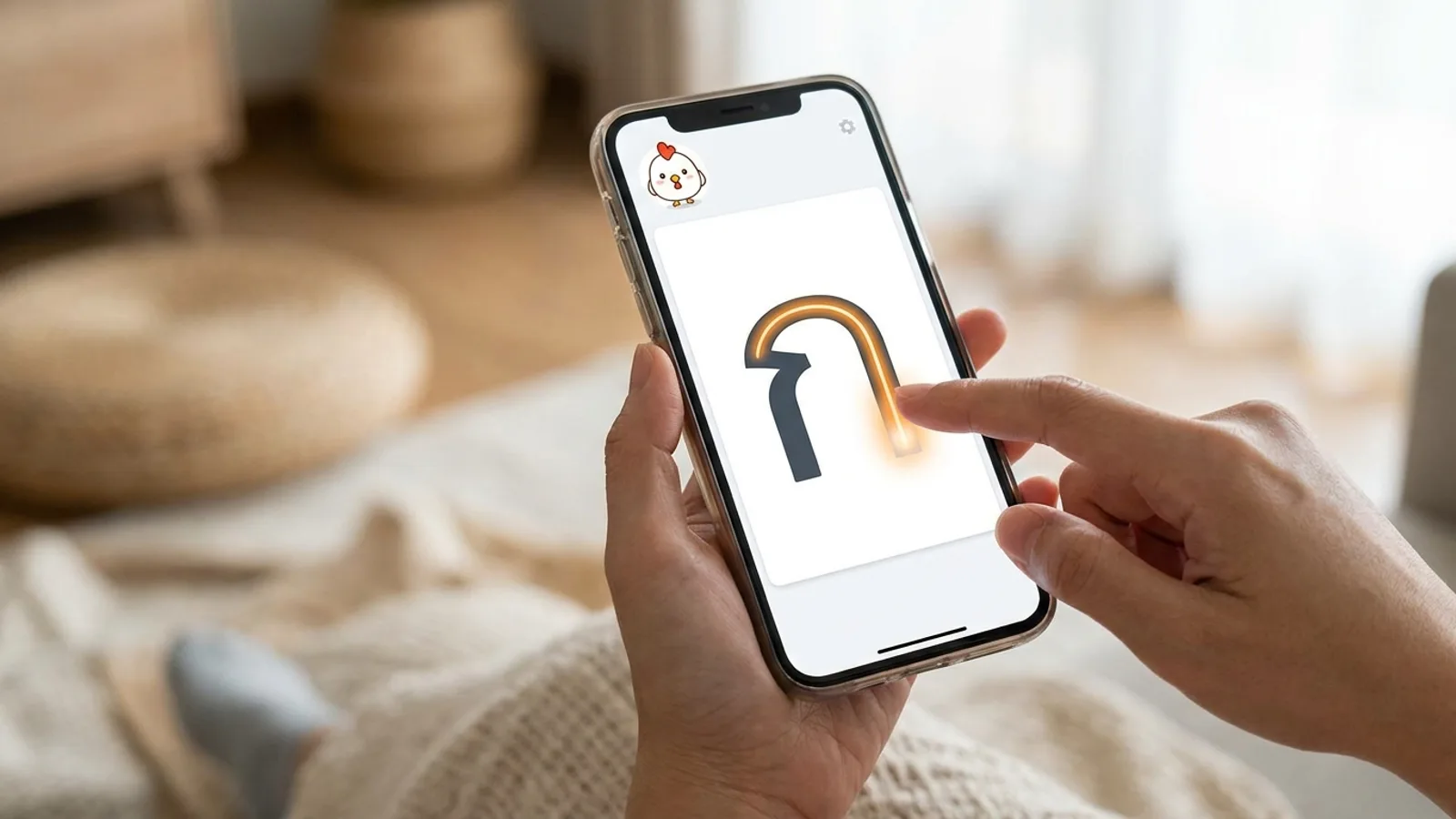
GorGai is a free web app for learning to read and write the Thai alphabet. It is named after ก ไก่, gor gai, the first letter and the chicken that goes with it, which is how every Thai child learns the alphabet and how I eventually did too.
This is the announcement post. What it is, why it exists, and what I deliberately left out of it.
I wanted to read Thai. Not the taxi-and-restaurant survival kit, the actual reading, the menu without pictures and the sign that is not also in English.
Everyone gives the same advice: start with the alphabet, write it by hand, let repetition do the work. So I found a worksheet PDF, printed it, and traced letters until the page was full. Then I printed another one.
Somewhere in there I realised the problem. I had no idea whether any of it was right. My ฐ looked like my ฎ. Both looked like a small bird that had given up. There was nothing to check against and nobody sitting next to me to ask, so I was practising being wrong, very neatly, in pen.
That is a solvable problem, and it is solvable with a canvas and a guide layer. So I built the thing I wanted instead of printing a third worksheet.
It teaches the 44 Thai consonants and 32 vowel forms in three modes, which are really three stages of knowing a letter.
- Trace. A semi-transparent guide character sits on the canvas and you draw over it with a finger, a stylus or a mouse. This is for the stage where you do not yet know the shape.
- Write from memory. The guide disappears. You draw the letter, then reveal the correct one and mark yourself right or wrong. This is the stage that actually builds the memory, and it is the one worksheets cannot do.
- Read and recognise. You see the letter cold and try to recall its name and sound before revealing it. This is the stage that matters when you are standing in front of a sign.
Around that there is a full alphabet chart, the consonant tone classes colour coded (mid, high, low), a page explaining the tone rules, and word-reading flashcards for when the individual letters stop being the hard part. You can filter down to just the letters you keep getting wrong, which is where most of the value is once you are a couple of weeks in.
This is the part I care about most, and it is the same instinct I bring to client work.
- No account. You do not sign up. Progress is saved in your own browser, which means it is yours, it is instant, and I never see it.
- No paywall and no free trial. It is free, and it stays free. There is no premium tier waiting to appear once enough people use it.
- No streak guilt. There are optional practice reminders if you want them, and that is the extent of it. Nothing turns red because you missed a Tuesday.
- No app download. It runs in the browser and works on a phone. You can add it to your home screen if you want, but you do not have to install anything to start.
Fifteen minutes a day beats two hours on a Sunday for this kind of memorisation, and fifteen minutes a day realistically happens on a phone, standing up, somewhere inconvenient. Everything above follows from that.
GorGai is an Astro static site with plain vanilla JavaScript. No React, no Vue, no client-side framework at all. Astro renders the page shells at build time and the interactive parts are ordinary .js files.
That is not purism, it is the right tool. The whole app is a canvas, some state and a lot of letter data. A framework would have added a bundle to download before anything appeared on screen, and the single most important property of this app is that it opens instantly on a mid-range phone on mobile data. If I had reached for the default stack out of habit, it would be slower for no benefit anyone using it would ever notice.
I have written about that trade-off in more detail in my comparison of Astro vs Next.js vs WordPress, and GorGai is a fairly pure example of the case for Astro: content-heavy, interaction-light, and speed-sensitive.
Complete beginners, mostly. English speakers who have decided to stop guessing at signs. Expats who have been in Bangkok or Chiang Mai for a year and are quietly embarrassed about it. Anyone who has learned some spoken Thai from romanised text and hit the ceiling that always comes.
It is also useful if you already read a bit and there are eight letters you still mix up, because you can filter the practice set down to exactly those and stop wasting time on the ones you know.
The realistic timeline is that recognising all 44 consonants takes one to two weeks of short daily sessions, and writing them from memory takes two to four. That is a smaller commitment than the alphabet looks like from the outside.
Yes. GorGai is free to use with no account, no trial period and no premium tier, and it will stay that way. The site carries ads, which is what covers the hosting, and they are deliberately kept out of the practice area itself. There is nothing to buy and nothing to unlock.
No. GorGai runs entirely in your browser on a phone, tablet or computer, with no download and no app store. You can add it to your home screen so it opens like an app if you prefer, but that is optional. Your progress is saved locally in the browser you use, so practising on the same device keeps everything in place.
It is at gorgai.net if you want to try it. Start with the consonants, do ten minutes, and see how many you can still name tomorrow.
If you have feedback or something is broken, there is a feature request page on the site and I do read it. And if you are a business in Singapore wondering whether the person building your website actually builds things, this is the honest answer: sometimes, at night, for a language I still cannot really speak. Have a look at what I do for clients or get a quote.